Cord cutting means cancelling cable or satellite TV and watching over the internet instead. Most households do it to save money, but also for more choice and the freedom to watch on any screen. This guide gives you a simple plan so the switch goes smoothly and nobody at home misses their favourite channel.
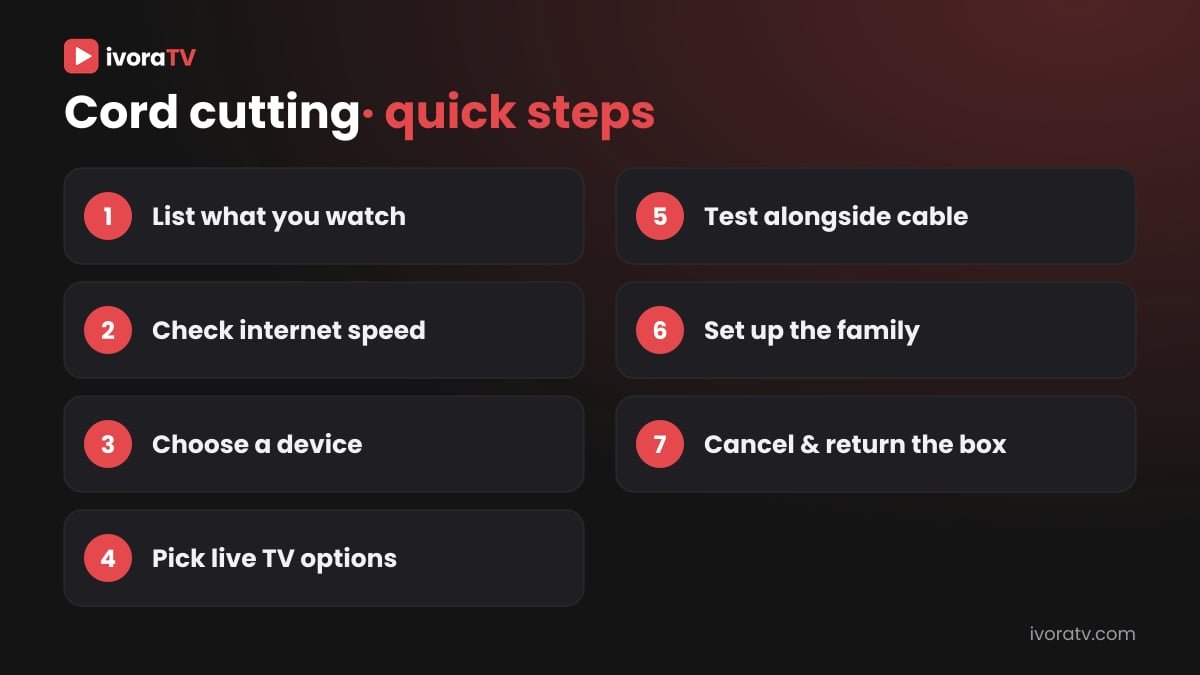
Step 1: List what your household actually watches
For one week, write down every channel and show people watch: news, sport, kids’ channels, series. Most families find they use 10 to 20 channels out of hundreds. This list is your checklist for every option you consider. You can compare it with our channel list.
Step 2: Check your internet
Your internet becomes your TV, so it has to be up to the job. Count about 15 Mbps per HD screen and 25 Mbps per 4K screen watching at the same time, plus room for everything else (phones, video calls, games). Test in the evening, not in the morning. Details in our internet speed guide. Note that if your internet comes in a bundle with cable TV, cancelling TV can change your internet price: ask your provider before you cancel.
Step 3: Choose your device
Many Smart TVs can run streaming apps directly (see our Smart TV guide), but a streaming device is often faster and supports more apps. Popular choices are a Fire TV Stick, an Android TV / Google TV device and Apple TV. Our best device for IPTV comparison helps you choose.
Step 4: Pick how you’ll get live TV
- Free over-the-air TV with an antenna, where available, for local channels. In the US, the FCC’s antenna guide explains how it works.
- Live TV streaming apps from broadcasters and streaming companies.
- An IPTV subscription with live channels, a TV guide and on-demand content in one app. See IPTV vs cable for how they compare.
Whatever you choose, check it has the channels on your list from step 1, works on your devices and has a clear refund policy. Our 9-point provider checklist helps you judge.
Step 5: Test before you cancel
Run your new setup alongside cable for a few days. Watch at peak time, during a live game and on every TV in the house. A 24-hour trial is the cheapest way to do it: here is what to test.
Step 6: Set it up for the family
- Add favourites on each TV so everyone finds their channels quickly.
- Set parental controls on kids’ devices: see IPTV parental controls.
- Use a wired connection for the main TV: see our Ethernet adapter guide.
- Check connections: if two TVs watch at once, you need two. See multiple devices.
Step 7: Cancel cable and return the equipment
Call or go online to cancel, ask for the exact end date and any early termination fee, and return the cable box and remote to avoid equipment charges. Keep the return receipt.
Common cord cutting mistakes
- Cancelling before testing at peak time.
- Forgetting that the internet price may change without the TV bundle.
- Relying on weak Wi-Fi for the main TV.
- Signing up for many separate apps and ending up paying almost as much as cable. Review what you use every few months.
Stay on the right side of the rules
Choose services that are clear about who they are, how they work and how to get support, and read our guide is IPTV legal? before you subscribe to anything.
How much can cord cutting save?
It depends on your current bill and what you replace it with. The savings come from removing the cable TV package, box rental and extra fees. To see your real number, write down your current monthly TV costs (including box and fees), then add up the monthly cost of everything you plan to use after cord cutting. If the difference is small, review which apps or subscriptions you actually need.
Cord cutting and your internet plan
- Look for a plan with no data cap, or a cap high enough for daily streaming.
- Put the router in a central spot, or add a mesh system for large homes.
- Use Ethernet for the main TV.
- Test speed in the evening, when everyone is online.
A strong connection is the foundation of cord cutting: get it right and everything else is easy.
Cord cutting checklist
- Channel list written down.
- Evening speed test done.
- Device chosen for every TV.
- Live TV option tested at peak time.
- Parental controls set.
- Cable cancelled and equipment returned.
Cord cutting for sports fans
Sport is often the last reason people keep cable. Before cord cutting, list the competitions you follow and check how you will watch each one. For live games, a wired connection and a capable device make the biggest difference, and you should test a live match during your trial, not just a regular channel. Our IPTV for sports guide explains how to get smooth, low-delay games.
Ready to start?
Set up your device with our setup guides, then test ivoraTV with the 24-hour trial. Questions? Message us on WhatsApp, 9am–10pm ET, 7 days a week.
Frequently asked questions
What do I need to cut the cord?
A good internet connection (about 15 Mbps per HD screen, 25 Mbps for 4K), a Smart TV or streaming device, and a way to get live TV such as an antenna, live TV apps or an IPTV subscription.
Will cancelling cable change my internet price?
It can. If your internet is part of a TV bundle, the price may go up without TV. Ask your provider before cancelling.
How do I make sure I don't lose channels when cutting the cord?
List the channels your household actually watches for a week, then check each option against that list and test it during a trial before you cancel cable.
Don’t have ivoraTV yet?
Test it for 24 hours for $2 · 14-day refund policy on yearly packs